
[아두이노] ESP32 Boot Mode
 양재동메이커
- Link
- https://mytodoro.tistory.com/3127
- https://github.com/espressif/esptool/wiki/ESP32-Boot-Mode-Selection124
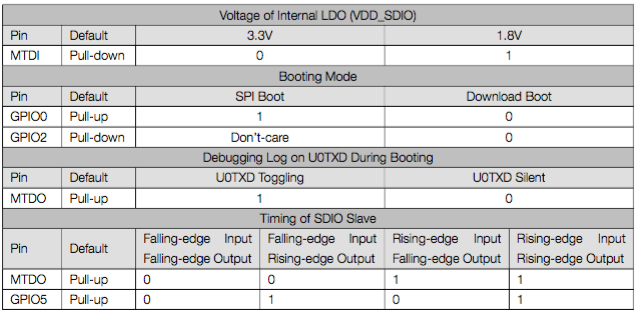
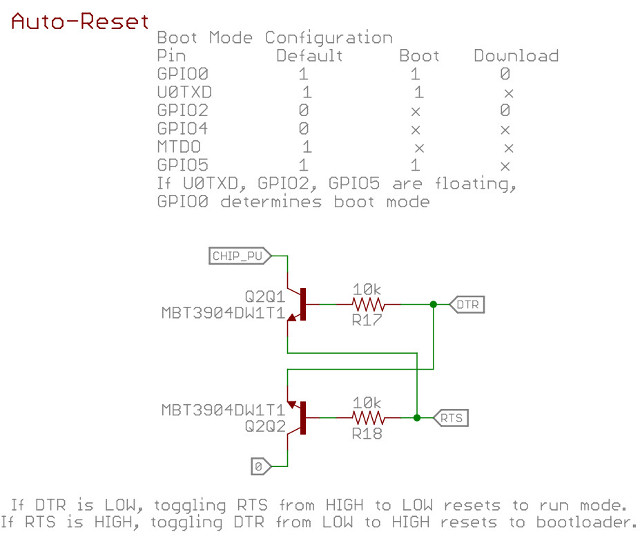
1. ESP32의 경우 Booting에 관련된 핀들은 위 5개의 핀들 입니다.

2. Pins used for programming
GPIO0 (internal pull up resistor)
H / floating = Normal execution mode – "SPI Boot"
L = On powerup will select ROM serial bootloader mode for programming – "Download Boot"
GPIO2 (internal pull down resistor)
If GPIO0 = L (bootloader mode) then GPIO2 must be L / floating in order to enter the serial bootloader
If GPIO0 = H (normal execution mode) then GPIO2 is don't care.
GPIO12 (internal pull down resistor)
If GPIO0 = L (bootloader mode) then GPIO12 must be L / floating to select flash voltage (VDD_SDIO) 3V3.
If GPIO0 = H (normal execution mode) then GPIO12 can either state
GPIO15 (internal pull up resistor)
H / floating = Normal boot messages output
L = silences boot messages printed by the ROM bootloader



임베디드 보드
최근 게시물
 HellMaker


Tag Clouds